Oh I’m not saying I would delete car insurance or not pay it. I guess I was just using it as an example of how there are sooooo many categories.
2 Likes
Yeah I think this is where I am. Helpful to hear this from another person.
2 Likes
thanks for outlining all this! Theoretically I know how it all works, but it’s a mindset that I’m just not used to yet.
Also complicating this is that I’m only tracking/allocating my own bank account, and my partner has his own that’s not part of YNAB. And truthfully I’m not the only one in charge of a lot of the expenses that I say I am in YNAB.
3 Likes
It doesn’t feel great but I take comfort in the age of money stat!
2 Likes
I am in the same situation. I don’t have enough money to fund every single category every month. I tried to have less categories, but I prefer the granularity. So what I do is , everytime I get paid I allocate money to my monthly bills and stuff like groceries, etc and annual bills that I fill 1/12th of the amount every month. I also have a set amount of fun money . Anything that is left goes in a general « cash savings » category that is intended for true expenses.
My goal is to top the « cash savings » category to a certain amount, than my leftover money will fund my emergency fund, and then any investment goal that I have. But when true expenses will occur, I will pull from the cash savings category and fund the true expenses that needs attention.
Let me know if it’s not clear!
5 Likes
If you are not responsible for a given category/it doesn’t come out of your pot of money, it might make sense to rethink how you are handling those categories.
People more familiar with the new YNAB tricks can maybe give better suggestions, but if you still want to track these things, but they aren’t your responsibility and don’t come out of your accounts, you could set up a separate “income” or “partners money” type that flows in and immediately out when those expenses are made. I’m not sure what the most graceful way to handle that is besides actually connecting (or manually tracking) the other account. But the ynab style of budgeting (or even tracking) is hard when you don’t give it the full picture!
1 Like
This makes sense–thank you!
1 Like
I am finding that! I may need to rethink whether it’s worth it because my partner will likely never get on board with using it alongside me lol
If you have visibility on his accounts, he doesn’t have to get on board!
I’ve noticed that in the recent YNAB channel videos (yes, I watch them because I’m a nerd and Hannah is a delight) they talk about your “spending plan” rather than “budget.” I wonder if thinking of it that way would be helpful for you.
1 Like
I wish!
And I watch those too sometimes! thanks, it is probably a helpful reframe.
1 Like
Sorry to resurrect zombie thread but I have a YNAB question!
Does anyone really understand how the credit card category works? Last month one of the categories was showing as deep red even though I had assigned money to cover all the spending and I had to assign a could thousand dollars. Now they are showing hugely green but my Ready to Assign is way red.
Like, the green amounts are more than the balance on the card. What gives? I tried reading YNAB’s explanation and didn’t really understand it.
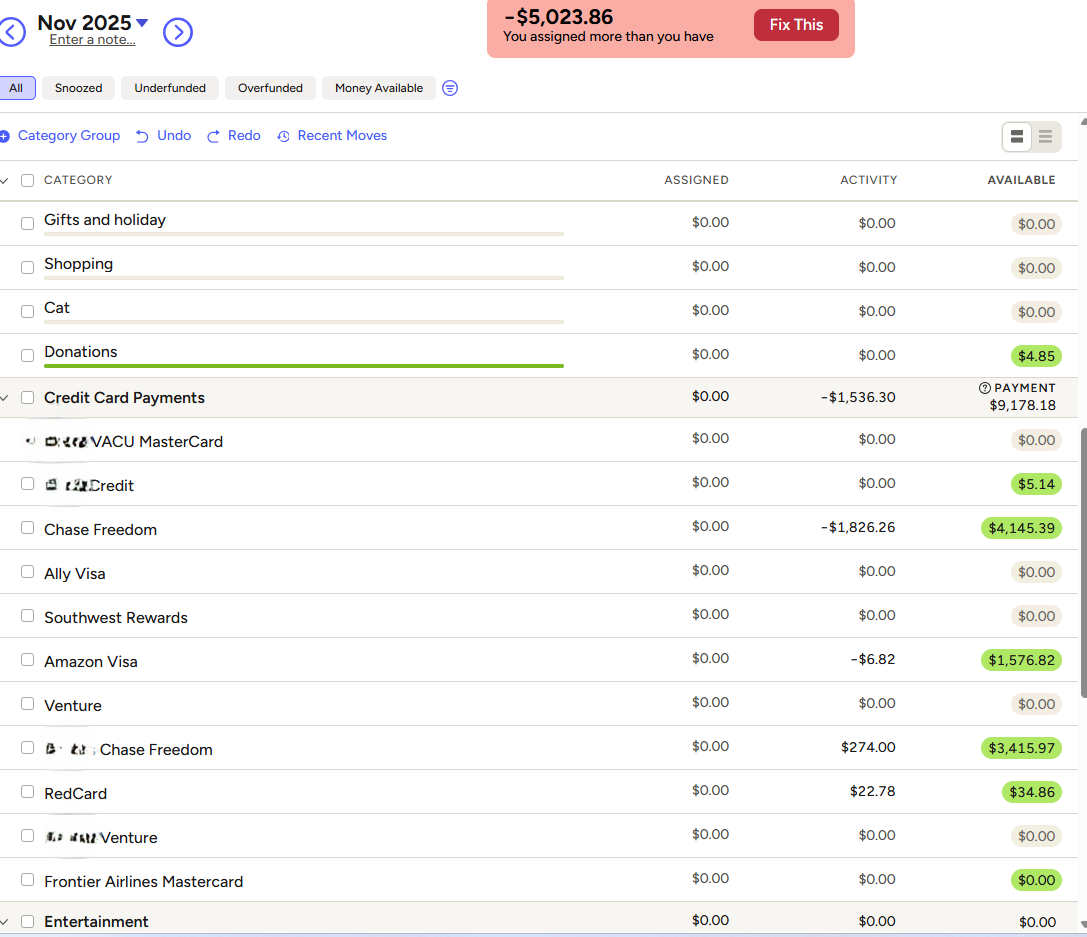
1 Like
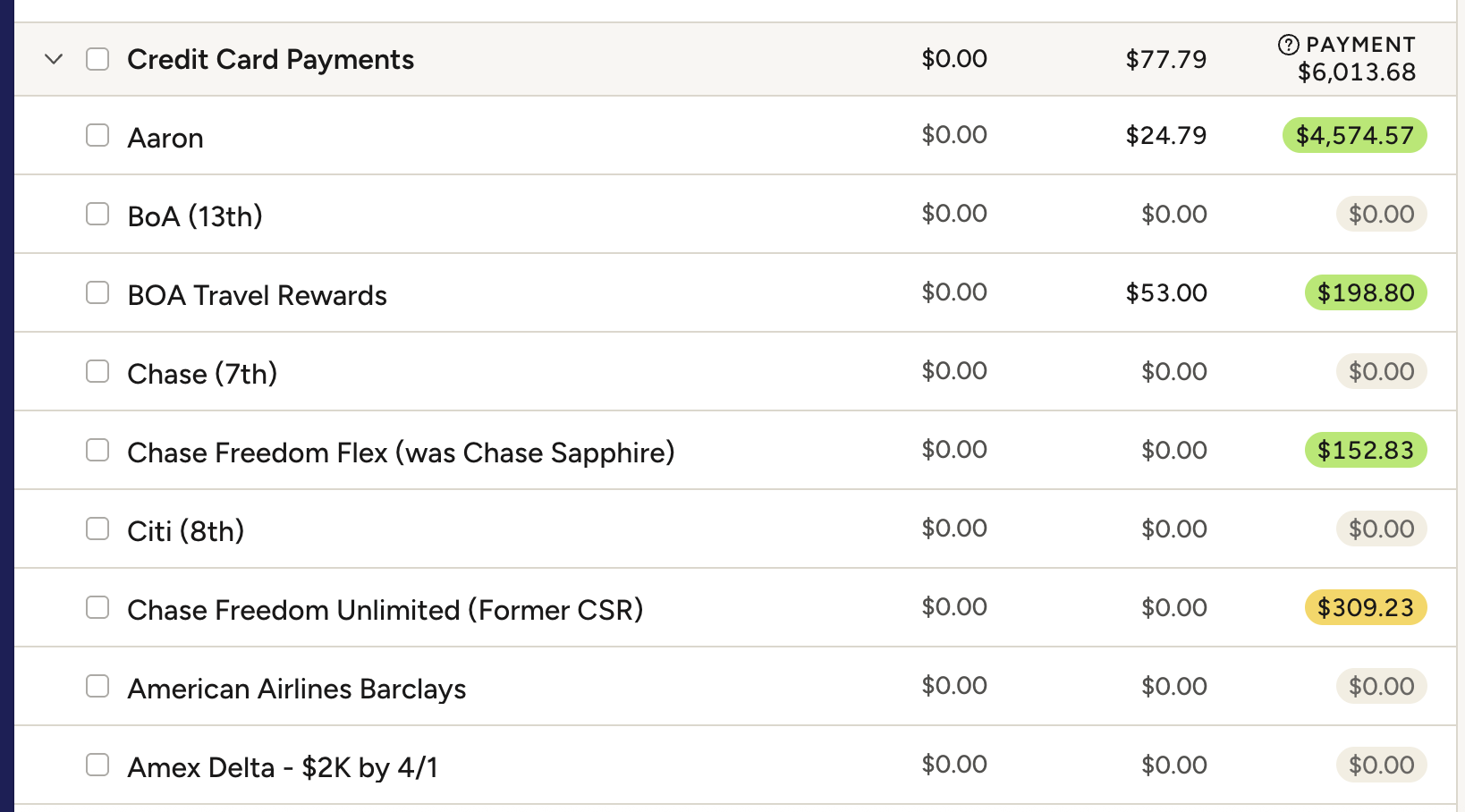
looks like you assigned money to your credit card categories last month. If they are set up as credit cards the spending is automatically assigned and you shouldn’t assign more
1 Like
Do I fix it by removing some or will it go away on its own as I use the cards? I swear I only assigned money if it was telling me I needed to!
I would remove it in the previous month. THey should look like $0 in the assigned category like this, but the middle category will have YNAB auto assignments
1 Like
I’m sorry, I’m extremely tired so please forgive me if I am being a little dense.
I went back and I actually do not see any money manually added in the left column. They’re all 0. Should I remove money from the right-hand side (green column)? There is so much more $$ there than seems necessary and I think that’s why my Ready to Assign is so negative.
Did you go to the previous month? Or this month?
1 Like
Several months back just to be sure.
Ynab takes the money from the spending categories to cover the cc balance. If your spending categories doesn’t have enough money in it, it will show red in the corresponding credit card, but once you add enough money to the right spending category it goes green again.
Sometimes my cc categories get out of sync because the pending charge and final charge are slightly different and both show up… So over time I get a positive balance. Every 6 months or so I usually reconcile all of the credit card accounts, where I click the reconcile button in the corner, put in the actual balance and make sure that is all correct. Then if the cc shows a positive amount, higher than the balance, I decrease that amount from the “available for payment” number and make it match the balance too. The amount you remove from “available for payment” will show up in your “ready to assign” area
3 Likes
Thank you, I tried that and it seemed to work I hope! We will see if anything turns angry red later. Now each card shows the balance on the card as what’s available and instead of being like -$5K, it says I have $173.
I don’t know how they got so very far off but I will try to keep an eye on it in the future. I’m happy to have a positive # even if it’s small! Definitely less than I am about to spend at Costco 
5 Likes
Thank you for posting the question. This happens to me too. I usually assign more or less money in the left column, so will try solutions recommended hete.
1 Like